
Tendo Marketplace Services
Tendo Marketplace for Providers
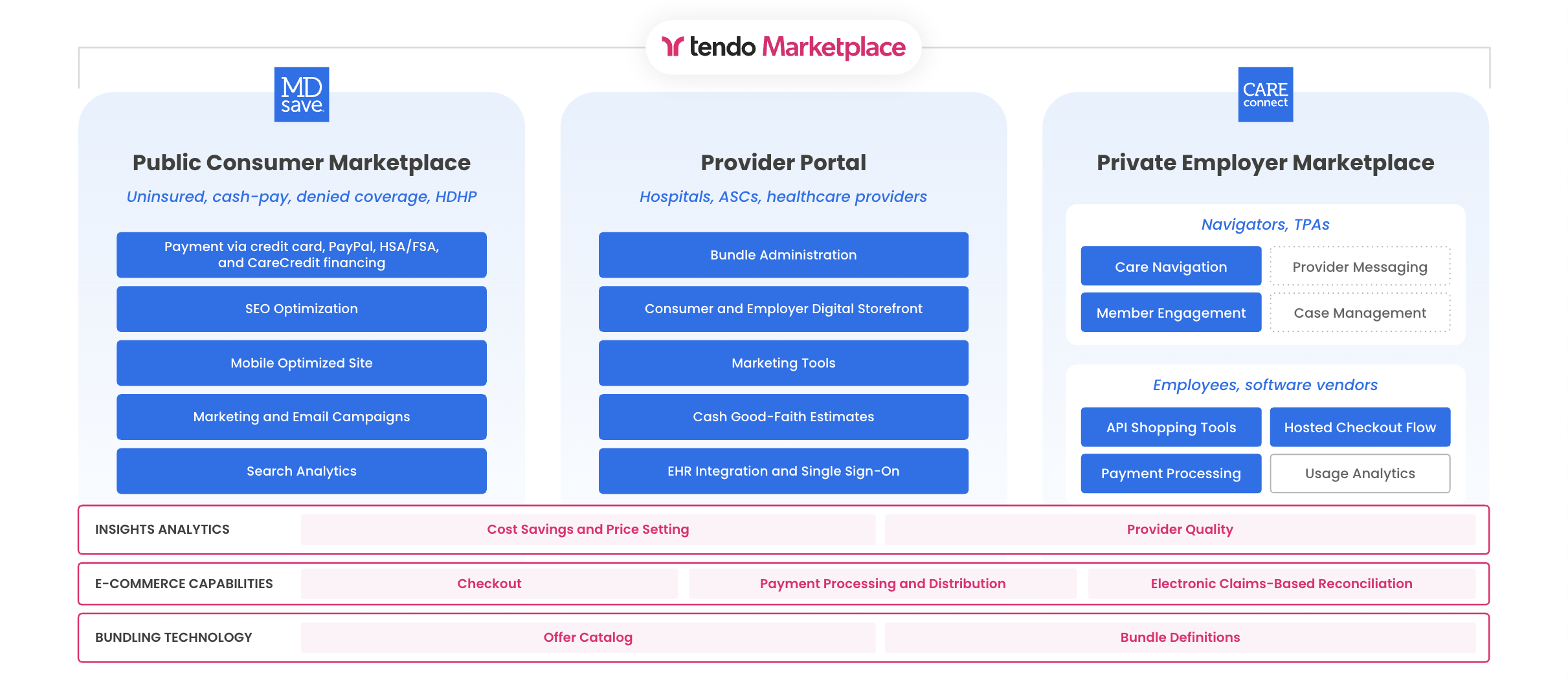
Tendo Marketplace for Providers enables staff at healthcare facilities to manage, purchase, and share Tendo Marketplace procedure bundles offered to patients and/or employer care navigators. Provider staff also may use Tendo Marketplace software to redeem MDsave and Care Connect vouchers and view reports and dashboards related to procedure sales.
Facilities can choose whether they want to list specific procedures/treatments for sale on mdsave.com,.Care Connect marketplaces for a wide range of employers, and/or Care Connect portals that are available to specific companies. Additionally, provider staff can purchase procedures for patients.
How Tendo Marketplace Works
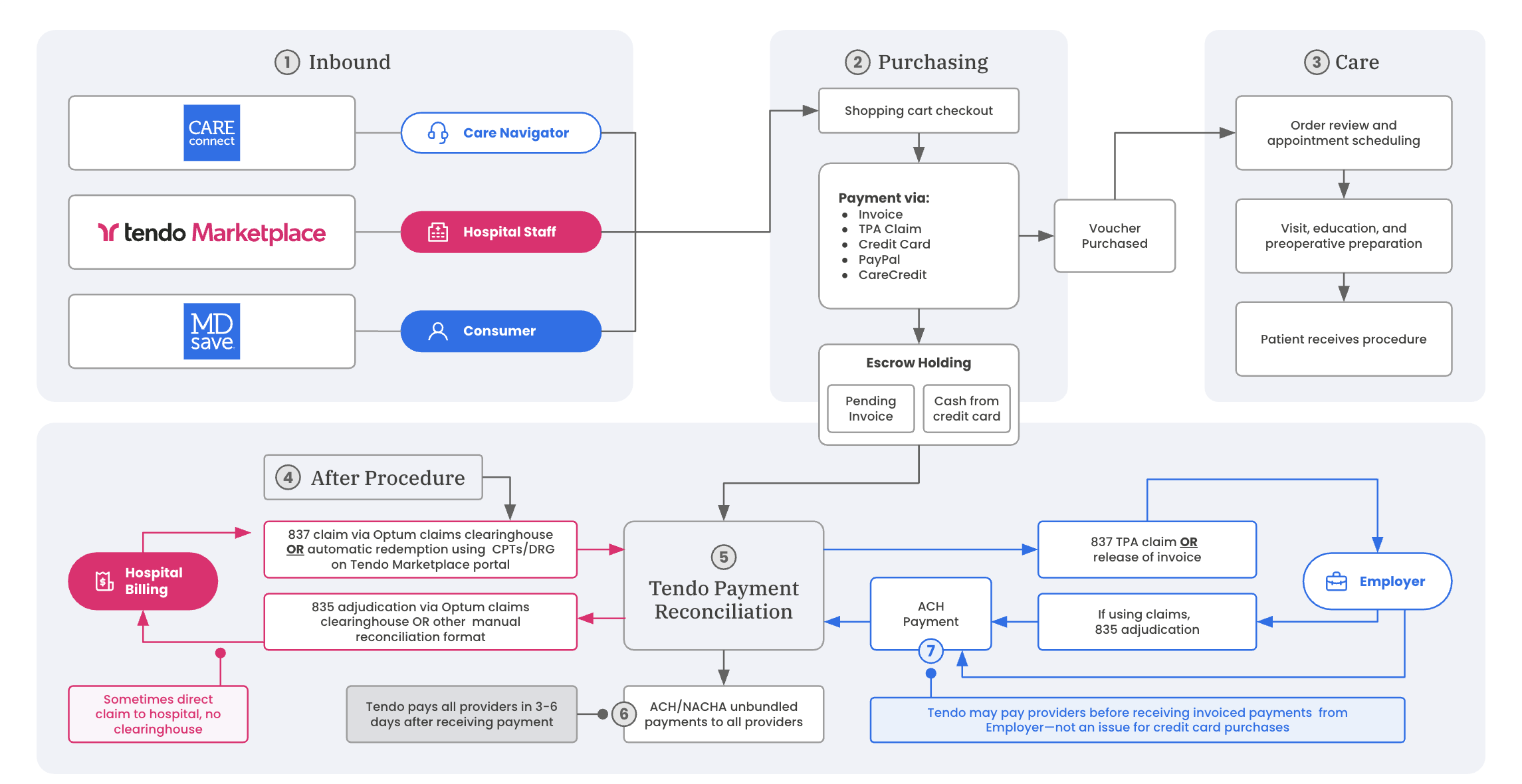
Tendo Marketplace serves public consumers who self-pay for procedure vouchers on the mdsave.com website, and private employers whose care navigators purchase vouchers as part of the employers' employee healthcare plans.
This diagram shows the procedure purchasing and payment flow.
General User Experience
Single Sign On - Users can log in to Tendo Marketplace for Providers on the mdsave.com website using Single sign on (SSO) or an email and password. Tendo Marketplace allows users to use SSO using SAML from an identity provider or FHIR from Epic EHR. SSO is supported from standard providers such as EHR/Smart on FHIR, Imprivata, Okta, and Active Directory for improved convenience and security.
Manage Users and Permissions - Users who need an account or administrative access can submit an access request to Tendo Support. Administrative users can add or delete other users to their group or system or ask their Tendo account manager to do so.
Procedure Search - Hospital staff users can search for medical procedures by procedure name, common procedure synonyms, CPT® code, or browse procedures by name, specialty, or provider. They can add those procedures to a shopping cart.
Save and Share Shopping Carts - Staff can save a shopping cart that is loaded with one or more procedures for a patient or share the cart with a patient by email or text. Shared carts allow patients to purchase vouchers in the cart on their own using a credit card or other payment options such as Care Credit or PayPal. General staff users can access shared and/or saved carts through the Patient Carts page.
Purchase Procedures - General staff can purchase a shopping cart or previously saved/shared shopping cart on behalf of a patient. Users may use credit card(s), cash, or a combination of cash and credit card(s) to purchase procedures.
Redeem Vouchers - Staff members can redeem vouchers, which triggers distribution of payment to the providers included in the bundle. Users can either manually redeem vouchers for patients who have received care by entering information about the service on the Vouchers page or providers can send claims electronically to Tendo Marketplace through a clearinghouse to trigger redemption.
Deductible Checker - Users can access a deductible checker that provides information on a patient’s individual and family deductibles and out-of-pocket maximums for their commercial insurance.
View Payment Reports (PDF, CSV, other electronic formats) - Administrative users can download a PDF or CSV payment reconciliation report that corresponds to a weekly payment from Tendo Marketplace to the provider. The reports contain information about each individual voucher included in the payment such as name, date of birth, and procedure name.
Users also can receive other electronic file formats such as 835 ERA or Epic Self Pay Flat File.
View Dashboard - Administrative users can view a dashboard of their historical voucher sales and redemptions. The users can filter for date range and set a goal for their monthly voucher sales. They can download a detailed Excel file of the voucher data.
Access history of their vouchers - Administrative users can access a history of vouchers purchased at their group and search those vouchers by patient name, procedure name, account number, voucher number, or order number. Users can also filter vouchers by whether the vouchers are redeemed, available, or canceled.
View Recommended Payment Amounts - Administrative users can view recommended rates based on a percentage of Medicare modified for specific localities. Users can export the pricing to an Excel spreadsheet.
List Procedures Available for Purchase - Providers can choose which procedures to list and the price for their portion of the bundle. Tendo will update the website to include those procedures after all portions of the bundle have confirmed their rates. Providers can update their rates at any time by contacting their Tendo Marketplace account manager or customer success manager.
Create and Manage Provider Profiles - Users can create provider profiles that will be used to list procedures on the Tendo Marketplace. Users can edit these profiles and add various information such as the name, specialty, office hours, address, profile picture, etc.
Private Label sites - Depending on a provider’s contract, providers can have private label sites that can be accessed by the public to purchase procedures. The private label sites can be set up to limit the procedures either to a specific group or system of groups and display the group’s logo prominently in the website header.
Order Marketing Materials - Users can submit requests for printed Tendo Marketplace marketing materials.
Training - Users can access our training platform to complete a training course with built-in completion tracking, quizzes, and certification.
MDsave.com
On the publicly available mdsave.com website, patients can browse or search for medical procedure bundles and purchase vouchers for them before they receive the care. The website displays the prices for procedure bundles and what is included in them, often at a substantial discount. Providers participate in providing the bundles through Tendo Marketplace for Providers.
User Experience
Patients can:
Access the site on mobile and desktop devices.
Search medical procedures by procedure name, common procedure synonyms, CPT® code, or DRG code (when applicable) or browse procedures by name or specialty.
Search or browse providers who participate on mdsave.com by name or browse them by name, specialty, or location.
Search/browse facilities - Hospitals, imaging centers, ambulatory surgical centers, and other facilities that participate in mdsave.com - by name or browse them by name or specialty.
View patient ratings of providers sourced from verified Tendo Marketplace purchasers and other medical websites that support patient ratings such as Healthgrades and Vitals.
Compare costs of procedures among participating providers and to estimated national averages.
Purchase procedures by creating shopping carts of selected procedures and purchase vouchers for the procedures in the carts via credit cards, Care Credit, or PayPal. Purchases made through the Care Credit credit card may qualify for special financing rates. After purchasing a procedure, users receive a PDF voucher that should be brought to the associated provider to obtain services.
Create and maintain a user account and access a history of their purchases, manage credit cards associated with their account, reset their password, and update their contact information and email preferences.
Access a deductible checker that provides information on their individual and family deductibles and out-of-pocket maximum expenses for their commercial health insurance. Users with mdsave.com accounts can save their insurance information to their account to enable quick deductible checks in the future.
Obtain instructions for submitting an application to their insurance company to have a Tendo Marketplace purchase count toward their deductible. This includes obtaining an itemized statement of purchases from Tendo Marketplace. Insurance companies decide whether purchased purchases are eligible to count toward a patient’s deductible.
Contact the Tendo support team for help by phone or online message submission.
Care Connect
Care Connect is a platform for self-funded employers, care navigators, third party administrators (TPAs), and alternative health plans to shop and purchase procedures from the Tendo Marketplace network in private employer marketplaces. With Care Connect, providers can list different services and rates for different audiences. Care Connect is available as a web portal or through integrations with the Care Connect API, allowing customers to embed the capabilities within existing applications.
User Experience
Single Sign On - Users can log in to Care Connect using SSO or an email and password. Tendo Marketplace provides users SSO using SAML from an identity provider or FHIR from Epic EHR. Single sign on is supported from standard providers such as EHR/Smart on FHIR, Imprivata, Okta, and Active Directory for improved convenience and security.
Access company portal through mobile and desktop devices.
Search for medical procedures by procedure name, common procedure synonyms, CPT® code, or DRG code (when applicable). Comprehensive network provides options for different types of patients to be seen at hospitals, ambulatory surgical centers (ASC), and imaging center locations.
Search for participating providers by name or browse them by name, specialty, or location.
Tendo Quality Scores - Users can compare the quality of providers for a given procedure using Tendo Quality Scores, a single score that comprises data on facility quality, provider quality, and patient experience data from sources including CMS and US News and World Reports. View patient reviews and ratings of providers sourced from verified Tendo Marketplace purchasers and other medical websites that support patient ratings, such as Healthgrades and Vitals.
Create shopping carts of selected procedures and, depending on a company’s configuration, purchase vouchers in their cart via patient credit card, a corporate card, or weekly invoicing. Users with invoicing can choose to split a payment in whole dollar amounts between a patient credit card and company invoicing in order to collect a patient’s responsibility for a deductible.
Save a shopping cart for a patient or share the cart with a patient by email or text. Shared carts allow patients to pay their responsibility through payment options including a standard credit card, multiple credit cards, Care Credit or PayPal, as well as split payment methods. Saved carts can be purchased by a care navigator user or shared with a patient. When creating a shared cart, the care navigator user can specify that the patient pay the entire amount or specify a patient responsibility with the remainder paid by the company via invoice.
Access a history of vouchers purchased by the company on behalf of patients and search those vouchers by patient name, voucher, or order number. The voucher history information can be downloaded as an Excel file.
Offer different sets of prices for different audiences - One set to employer partners, and optionally other prices on the consumer marketplace or to specific partners.
List and access fully bundled rates, with payment automatically distributed to each party. Predictable upfront pricing with no surprise bills for patients and employers. Hospitals can list prices across owned and unowned provider partners while letting Tendo Marketplace manage the payments.
Financing options for consumers and invoice terms for employers - With invoicing enabled for a company, view and download invoice statements and reports. With the appropriate permissions, company users can access a history of invoice statement PDFs of vouchers purchased and redeemed. More detailed information for each statement is available to download as an Excel file. Employers may also elect to receive the invoices as 837 claims electronically for reporting purposes from Tendo Marketplace through a clearinghouse.
View diagnosis and procedure codes associated with a procedure on invoice reports. When configured for a company, vouchers purchased by the company require the input of the related diagnosis and procedure codes upon voucher redemption by the servicing provider. This information will be reported in the associated invoice reports.
View customized copy describing the network’s offerings on the portal home page when utilizing a custom network of providers.
View a designation of procedures/specialties covered by a company’s plan in the company’s Care Connect portal.
Switch between different companies and provider networks depending on their company’s contract. A single user account can have access to one or more companies and users can easily switch between them when shopping for care. This allows a care navigation company user to shop on behalf of multiple clients, each with access to different networks of providers.
Submit requests for specific in-network providers to offer additional procedures or request that additional providers be added to the network. Users can make this request while shopping in the searched location for the searched procedure.
Compare the Tendo Marketplace costs of procedures to the average estimated commercial rates using an algorithm incorporating paid Medicare rates, a published study by RAND on percentages of commercial rates compared to Medicare, and inflation rates. This data is in beta and is only available for Care Connect users.
Collect a patient’s insurance information and view this information on invoice reports. When configured for a company, Care Connect users can add insurance company, member ID, Group ID, and a plan of care identifier for the patient at checkout. These fields are provided on payment reports.
Access a deductible checker that provides information about a patient’s individual and family deductibles and out-of-pocket maximums for commercial insurance for hundreds of supported insurance plans.
Access to dedicated account managers and US-based support for help with day-to-day questions, regular performance reviews and program advice. Contact Tendo Support via phone or the on-line contact form.
Cobranded Employee Self-Service Portal: Out-of-Pocket Payment
A company cobranded portal with a curated network of providers can be created for patients to shop on. Patients must pay out of pocket (Care Credit, Paypal, credit card, multiple credit cards, etc.) and there is no authentication.
API Functionality
The MDsave Care Connect API and data feeds allow users to:
- Embed searching and purchasing actions in other applications
- Access a data feed with all prices available on Tendo Marketplace
Ability to Embed Shopping Functionality in other Apps
With access to the Care Connect GraphQL API, users can embed the search and purchase functionality of the online portal in their own applications. Users are able to search for available offers on Tendo Marketplace, create and share shopping carts, make purchases via credit card or invoice, and view previously purchased vouchers.
Users must follow brand guidelines and terms and conditions.
Access a Pricing Data Feed
The API provides a JSON:API formatted data feed of all offers available to the Care Connect partner. This includes one file each for:
- Facilities - All hospital/clinic facilities on MDsave
- Providers - Medical providers associated with each facility
- Procedures - All distinct procedures available for purchase on MDsave
- Offers - Specific offerings (e.g., a procedure at a particular provider) that are available on MDsave, including the current price.
The data files are refreshed daily and are accessible using an API token.