When and How to Offer Tendo Marketplace
Talk with patients about their financial responsibility at the multiple touch points in their healthcare journey, from scheduling to discharge. If you can help them use Tendo Marketplace to pay in full upfront, they may save on procedure costs and you won’t need to send them multiple statements to collect.
IN THIS ARTICLE
The Tendo Marketplace Workflow for Providers
Scheduling and Pre-Registration
Emergency Department Discharge
The Tendo Marketplace Workflow for Providers
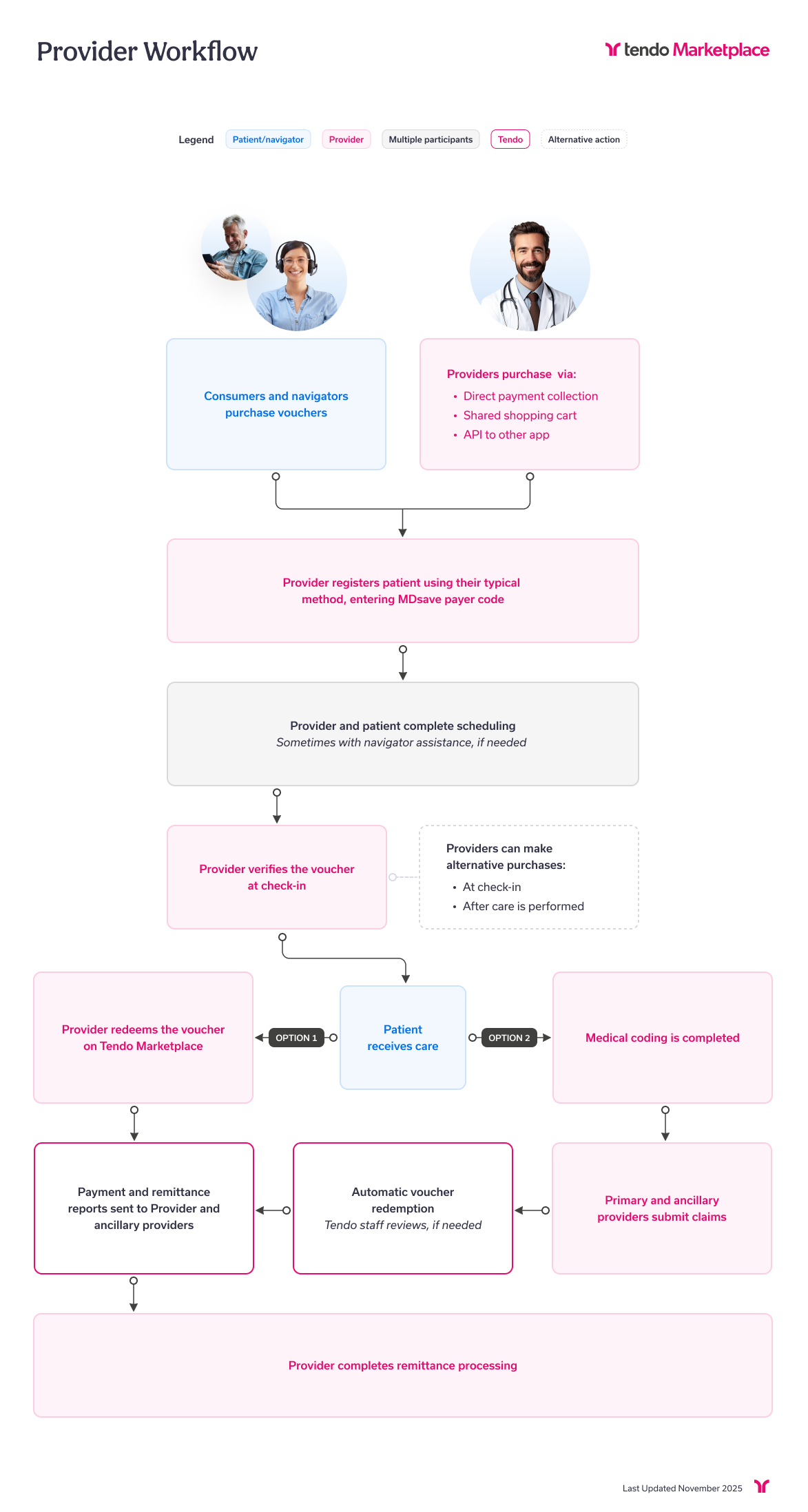
This diagram shows the general workflow for providers using Tendo Marketplace vouchers for services. Your workflow may vary somewhat according to your facility's policies.
Scheduling and Pre-Registration
Step 1 - Verify the patient’s insurance information and financial responsibility for the procedure.
Step 2 - Determine whether a patient is:
- Uninsured without commercial insurance, Medicare, Medicaid, or Tricare
- Insured with a remaining deductible that exceeds the procedure cost
- Insured but in need of denied or non-covered care
Step 3 - Help them understand their insurance:
- Deductible - The amount they have to pay out of pocket before insurance will pay
- Copay - The flat fee they have to pay with every service, even when insurance will pay
- Coinsurance - A percentage they have to pay for their service, even when insurance will pay
- What they have to pay out of pocket
Step 4 - Present all payment options, including Tendo Marketplace. Payment options include major credit cards, Health Savings Account (HSA) debit cards, Health Reimbursement Arrangement (HRA) debit cards, Flexible Spending Account (FSA) debit cards, and CareCredit (a health, wellness and personal care credit card). If they can’t pay right away, you can offer to send them a shopping cart that by text or email. However, reassure the patient that it’s beneficial to pay upfront through Tendo Marketplace because:
- All related fees are included so there are no surprise bills,
- For some procedures, your facility can offer lower prices for the same quality care because Tendo Marketplace makes the billing process more efficient.
Request payment from the patient for the voucher.
Step 5 - Instruct them to bring their purchased voucher to their procedure appointment.
Here’s recommended language to use:
“Bring your voucher to your procedure appointment. You can show it to your provider’s staff on your phone, bring a printed copy, or provide your voucher number. Tendo Marketplace vouchers include both Care Connect and MDsave — they are the same voucher, and you can simply refer to your voucher as an MDsave voucher when presenting it to the staff.“
Arrival and Registration
If the patient hasn’t already purchased a voucher for their procedure:
Step 1 - Explain your facility’s point-of-service payment policies.
Step 2 - Help the patient understand their out-of-pocket responsibility.
Step 3 - Request payment for their voucher at the point of service. Help them purchase and pay for the voucher.
Emergency Department Discharge
Step 1 - Discharge the patient.
Step 2 - Explain the Tendo Marketplace program and estimate the cost.
Step 3 - Once final charges are available, build the bundle and contact the patient to request payment.
Patient support is available through Tendo Marketplace’s Support Team in case of any procedure changes or questions that arise. Patients can email support@tendo.com or call 855.400.1228.
Contact your Tendo Marketplace account manager to advise your team on applying the above strategy in a way that best suits your facility.
Paying with CareCredit
Patients who are unable to pay at the time of service can apply for financing through Tendo Marketplace’s financing partner, CareCredit, if the procedure they are purchasing costs $200 or more. They can do so during checkout by selecting PAY WITH THE CARECREDIT CREDIT CARD. Refer them to http://carecredit.com for details.
CareCredit is subject to credit approval, and minimum monthly payments are required. CareCredit payment is subject to the representations and warranties in the CareCredit Agreement with Participating Providers, including but not limited to only charging for services that have been completed or that will be completed within 30 days of the initial charge.
Scripts You Can Use to Work With Patients
For Uninsured Patients
“We’ve partnered with Tendo Marketplace to make it easier for you to pay your out-of-pocket costs. It’s our hospital policy to ask you for payment when you come in for your procedure. With Tendo Marketplace, we’re able to offer you a lower, all-inclusive price in exchange for your upfront payment, and you won’t receive any surprise bills after your service. The upfront price is [$XX], and it includes [list included fees here, e.g., radiologist’s fee, facility fee, pathology fee, etc.]. I can go ahead and process your payment for you right here, or I can send you a shopping cart with your procedure(s) and you can pay on your phone.”
If the patient wants to be sent a cart, say: “Would you like me to send your cart in an email or a text?”
If the patient chooses to be sent a cart by email, say: “Do I have your permission to email your cart to you, and if so, what email would you like me to send it to? The cart will arrive in your inbox shortly, and it will take you to a secure landing page where you can enter your payment information.”
If the patient chooses to be sent a cart by text, say: “To send your cart by text, I need your cell phone number and your permission to text you since data charges might apply. Do I have your permission to text your cart to you?”
If the patient doesn’t want to pay at point of service or via a shared cart: “I understand that prepaying for your healthcare is a new idea. Would you like to talk to Tendo Marketplace’s Support Team? They can walk you through the whole process. Their phone number is 855.400.1228.”
Insured Patients with Denied or Uncovered Care
If the patient’s procedure isn’t covered or has been denied, say: “I verified your plan with [Patient’s Payer], and they said that this service [isn’t covered/ has been denied]. Don’t worry! We have another way we can get you the care you need. We’ve partnered with Tendo Marketplace to help you save money and make it easier for you to pay your out-of-pocket costs. It’s our hospital policy to ask you for payment when you come in for your procedure. With Tendo Marketplace, we’re able to offer you a lower, all-inclusive price in exchange for your upfront payment, and you won’t receive any surprise bills after your service. The upfront price is [$XX], and it includes [list included fees here, e.g., radiologist’s fee, facility fee, pathology fee, etc.]. I can go ahead and process your payment for you right here, or I can send you a cart with your procedure(s) and you can pay on your phone.”
If the patient wants to be sent a cart, say: “Would you like me to send your cart in an email or a text?”
If the patient chooses to be sent a cart by email, say: “Do I have your permission to email your cart to you, and if so, what email would you like me to send it to? The cart will arrive in your inbox shortly, and it will take you to a secure landing page where you can enter your payment information.”
If the patient chooses to be sent a cart by text, say: “To send your cart by text, I need your cell phone number and your permission to text you. Do I have your permission to text your cart to you?”
If the patient doesn’t want to pay at point of service or via a shared cart, say: “I understand that prepaying for your healthcare is a very new idea. Would you like to talk to Tendo Marketplace’s Support Team? They can walk you through the whole process. Their phone number is 855.400.1228.”
Insured Patients with a High Deductible Plan
If the patient’s remaining deductible is higher than their procedure cost, say: “I verified your plan with [Patient’s Payor] and they indicated that you have [$XX] remaining on your deductible this year. You’ll need to meet your [$XX] deductible this year before your insurance will start covering your medical expenses. [Patient’s Payer] estimates that this procedure will cost [$XX]. Our hospital policy is to collect this from you before you head back for your service. This price only includes the hospital fee, so it may not include related charges like physician fees.”
If the patient:
- Cannot or is not willing to pay their contractual rate
- Asks to be billed
- Asks for a payment plan
Do not set up the patient to be billed. Offer Tendo Marketplace instead. Say: “Don’t worry! We have another way we can get you the care you need, help you save money, and make it easier for you to pay your out-of-pocket costs. It’s our hospital policy to ask you for payment when you come in for your procedure. With Tendo Marketplace, we’re able to offer you a lower, all-inclusive price in exchange for your upfront payment, and you won’t receive any surprise bills after your service. The Tendo Marketplace upfront price is [$XX], and it includes [list included fees here, e.g., radiologist’s fee, facility fee, pathology fee, etc.]. We don’t automatically file this, but you can submit this purchase to your insurance company to see if they will apply it to your deductible. Your insurance company will decide if this is eligible for your deductible or not based on your health plan. I can go ahead and process your payment for you right here, or I can send you a cart with your procedure(s) and you can pay on your phone.”
If the patient wants to be sent a cart, say: “Would you like me to send your cart in an email or a text?”
If the patient chooses to be sent a cart by email, say: “Do I have your permission to email your cart to you, and if so, what email would you like me to send it to? The cart will arrive in your inbox shortly, and it will take you to a secure landing page where you can enter your payment information.”
If the patient chooses to be sent a cart by text, say: “To send your cart by text, I need your cell phone number and your permission to text you. Do I have your permission to text your cart to you?”
If patient doesn’t want to pay at point of service or via a shared cart, say: “I understand that prepaying for your healthcare is a very new idea. Would you like to talk to Tendo Marketplace’s Support Team? They can walk you through the whole process. Their phone number is 855.400.1228.”
Addressing Patient Concerns
Can I be billed instead?
“I know that paying up front for healthcare is a new idea, but it’s actually better for you in cases like this! You’re paying in full for [this service/these services], so it’s one less bill to pay and one less thing that can affect your credit. Since this price includes all of the related fees typically associated with your procedure(s), you don’t have to worry about any surprise bills popping up later. Plus, patients who use Tendo Marketplace to pay for their care save an average of 50% compared to the national average price for the same quality care. I can go ahead and process your payment for you right here, or I can send you a cart with your procedures and you can pay on your phone. If you’d be more comfortable with someone walking you through the process, I can also connect you to Tendo Marketplace’s Support Team.”
I can’t afford the Tendo Marketplace price.
“Tendo Marketplace has two promotional financing offers through its financing partner, CareCredit. Would you like to see some information about this option? Would you like me to connect you with a financial counselor to learn more about this option? I can also connect you to Tendo Marketplace’s Support Team. They can assist you with the application on the phone, and, if you’re approved, they can help you complete your purchase. You can email support@tendo.com or call 855.400.1228.
Why are you asking for payment up front now?
“I know that paying up front for healthcare is a new idea, but it’s actually better for you in cases like this. You’re paying in full for this service, so it’s one less bill to pay and one less thing that can affect your credit. Since this price includes all of the related fees typically associated with your procedure(s), you don’t have to worry about any surprise bills popping up later. Plus, patients who use Tendo Marketplace to pay for their care save an average of 50% compared to the national average price for the same quality care. I can go ahead and process your payment for you right here, or I can send you a cart with your procedures, and you can pay on your phone. If you’d be more comfortable with someone walking you through the process, I can also connect you to Tendo Marketplace’s Support Team.”
Will this apply to my deductible?
“Your Tendo Marketplace purchase may count towards your deductible, and your insurance company will decide if your purchased care is eligible. To submit your Tendo Marketplace purchase to your insurance company to be considered, contact the Tendo Marketplace Support Team at support@tendo.com or 855.400.1228. If you don’t know your deductible, you can find out using Tendo Marketplace’s free deductible checker tool available at mdsave.com/deductible.”
Note: Please make sure the patient knows the CPT® and diagnosis codes for the procedure(s) in their cart before instructing them to call the Tendo Marketplace Support Team.
How do I submit this to my insurance?
“You can submit this purchase to your insurance company to see if they will apply it to your deductible. Your insurance company will decide if this is eligible for your deductible or not based on your health plan. To submit this purchase to be considered, contact the Tendo Marketplace Support Team at 855.400.1228 or support@tendo.com. They’ll send your itemized statement to you, usually within one business day. Please have your CPT® and diagnostic code handy to give to the insurance company if requested (share the codes with them at this point).”
Your Profile and Tracking Your Voucher Purchases
Log into your account and click your initials in the upper right corner to see this dropdown menu.
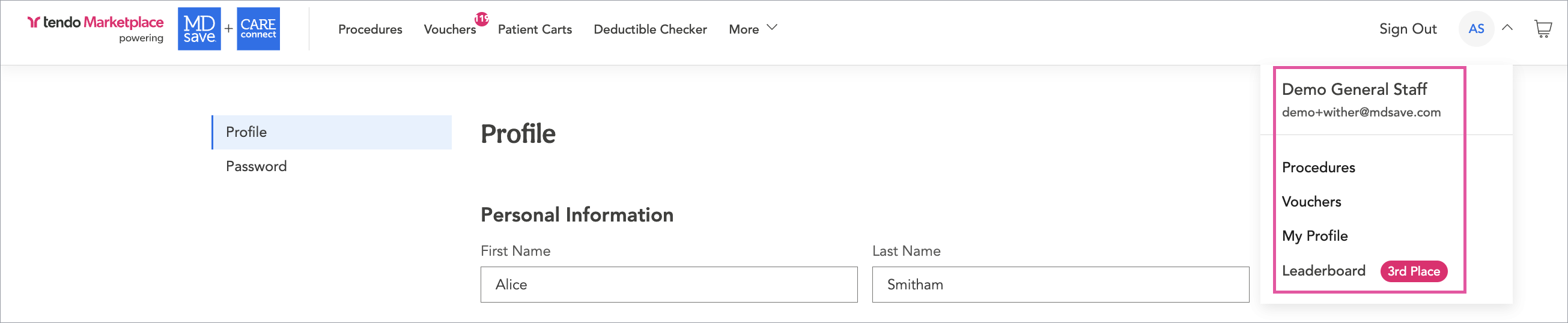
The first two items on the dropdown - Procedures and Vouchers - allow you to filter for Procedures and Vouchers. The third item, Profile, is where you can update your personal information.
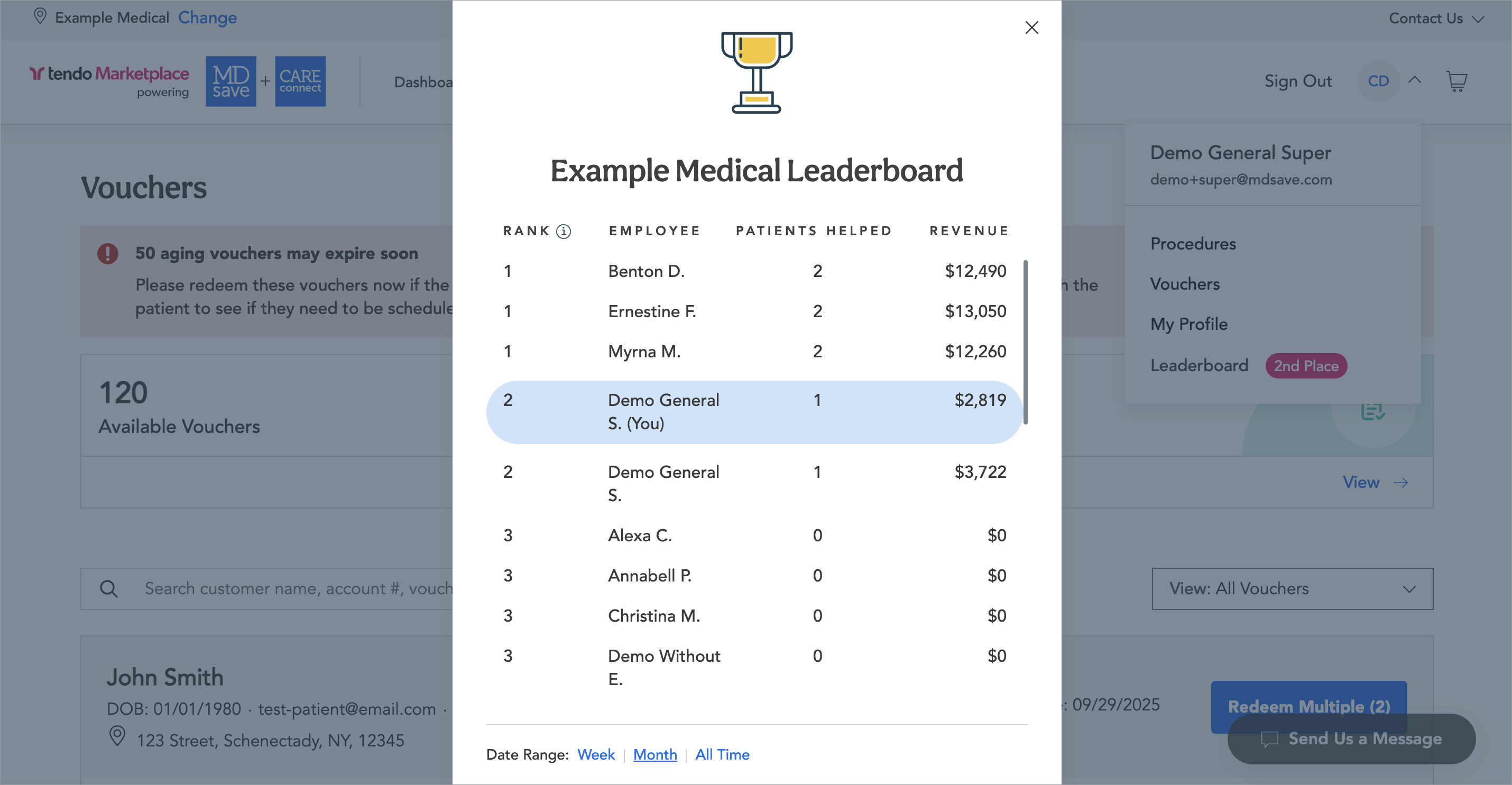
The fourth item is the Leaderboard. If your staff helps patients purchase vouchers, the leaderboard tracks your personal performance in helping patients purchase vouchers.
A colored tag next to the Leaderboard label displays your place on the leaderboard.
Click Leaderboard to see your rank and name, the number of patients you've helped purchase a voucher, and the revenue highlighted.