
Care Connect for TPAs Integration Guide
This guide outlines key integration details to help you understand how Care Connect works with your systems and processes.
How Integration Works
This diagram illustrates the end-to-end care coordination process when a Care Navigator or Primary Care Provider (PCP) refers a patient through the Tendo Marketplace. The workflow simplifies the referral experience, ensuring that patients receive high quality care with upfront pricing, built-in accessibility, and measurable cost savings for members and healthcare plans.
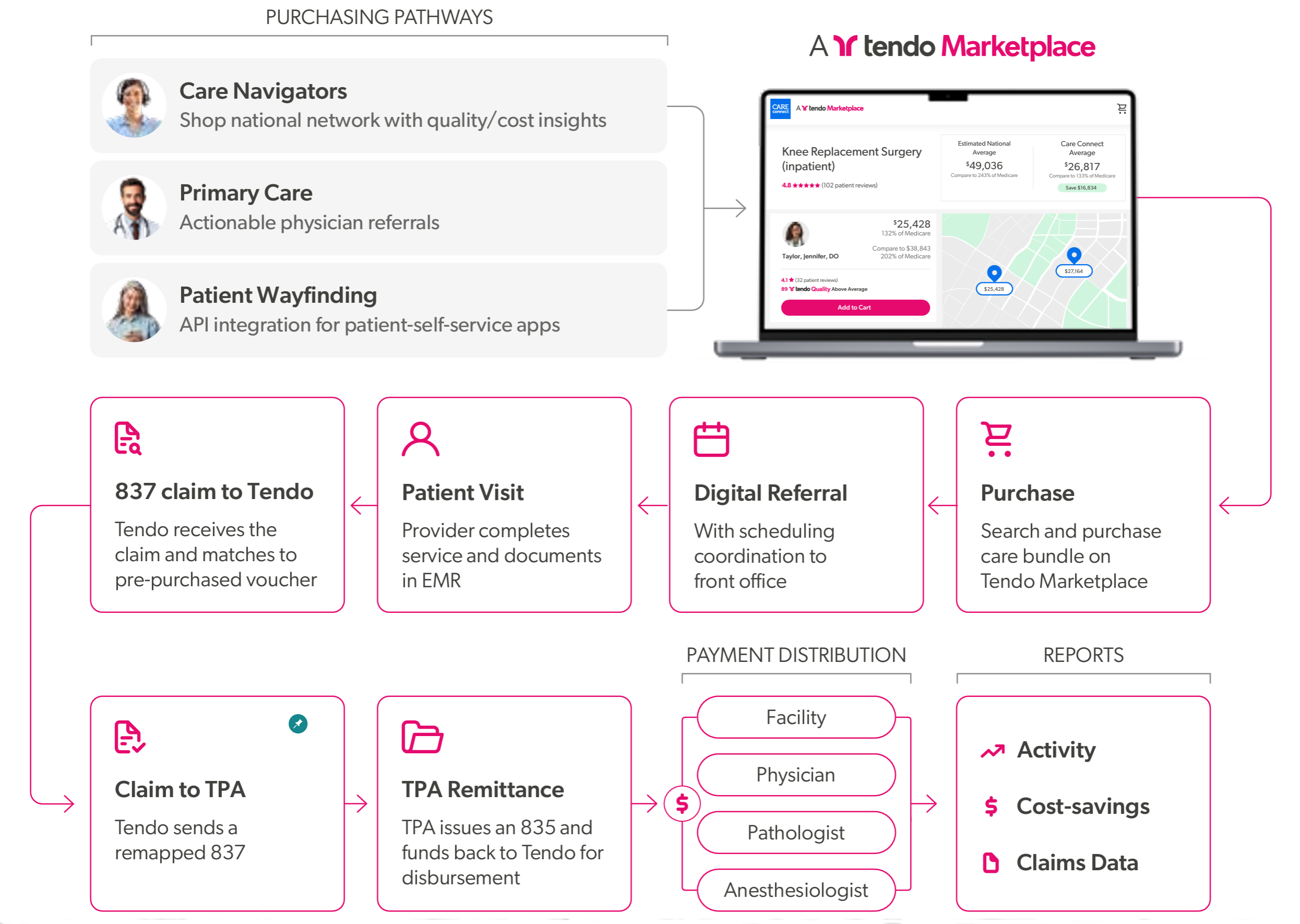
WORKFLOW SUMMARY
- Purchasing procedure vouchers on Tendo Marketplace can be done by Navigators, PCPs, or via patient wayfinding on patient self-service apps.
- The procedure voucher is purchased upfront as prepayment, but funds are not disbursed until the procedure is completed.
- Scheduling the procedure is coordinated with the provider’s front office.
- The provider completes the procedure and documents it in the Electronic Health Records (EHR) submission with Care Connect as payer.
- Tendo receives the 837 claim via the clearinghosue and matches it to the voucher.
- Tendo sends a bundled 837 to the TPA. The TPA issues an 835.
- The TPA sends funds to Tendo for disbursement to all parties involved in providing the service.
- Reports are generated on the activity, cost savings, and claims data.
NOTE: To get started quickly, or upon client request, a carve-out direct invoice process also may be used for payment.
Integration Details
Tendo Care Connect integrates directly with a self-insured employer’s TPA claims processor to automate payment requests, adjudications, and care navigation insights. While Care Connect is not an insurance company, we use standard X12 837 and 835 EDI claim protocols to support a streamlined cash invoicing and reconciliation process, enabling faster provider payments and supporting discounted, upfront pricing models.
TPA Integration Options
Care Connect can support a range of integrations with TPAs:
- Fee Schedule Configuration - at implementation for special adjudication rules if needed
- Claims Integration - 837 submission ↔ 835 reconciliation
- Data Sharing for Care Navigation - to improve referral patterns and outcomes
- Historical Claims Data - for population health and savings opportunity analytics
- Outreach Data Integrations (for Campaigns and Engagement):
- Eligibility Rules (834)
- Medication Claims via Pharmacy Benefits Manager (PBM)
- Prior Authorization Integration
Claims Integration for Payment Reconciliation Setup
- Share Care Connect’s procedure network and fee schedule with the TPA.
- Allow for custom pricing in direct contracting employer arrangements.
- Weekly fee schedule syncs (API or downloadable JSON:API) keep networks current.
- Network integration for claims via existing clearinghouse connections.
Payment Methods and Options
We support multiple payment methods, depending on the integration level:
| Payment Type | Preferred Option | Alternative Options | Requirements |
|---|---|---|---|
|
Paying invoices No claims received |
Reverse ACH / Direct Debit | ACH Push, Credit Card, check (fees may apply) | - |
|
Paying invoices While receiving 837 claims for reporting |
Reverse ACH / Direct Debit | ACH Push, Credit Card, check (fees may apply) | Must receive claims via Optum iEDI clearinghouse |
|
837 / 835 claims Partner must have a direct relationship with Optum iEDI or a relationship with another clearinghouse that can send/receive files from the Optum iEDI clearinghouse. |
ACH push with 835 ERA | - | Must send 835 ERAs via Optum iEDI clearinghouse with ACH trace number for reconciliation |
Other Care Connect Payment Options
- Corporate Card - At time of purchase
- Patient Checkout - Credit card payment
- Shared Cart Options - Credit card(s), CareCredit credit card, Paypal
Using the GraphQL API, patients and care navigators can complete checkout transactions and generate vouchers that they can use to pay for the services rendered by providers with a Checkout process. Types of checkout that can be done with the API include:
- Tendo fully invoices - The procedure is paid for by the partner, and no checkout view is required for the patient.
- Partner collects payment and Tendo invoices - The partner handles payment collection directly from the patient, using their own existing checkout workflows. Tendo invoices the partner for the full price of the purchase.
- A link is provided to the patient so that they can check out - The API is used to generate a checkout link that is provided to the patient, who can then complete the purchase via Tendo using credit card, Care Credit, or PayPal.
- Credit Card - The partner collects a credit card number and provides it to Tendo to complete checkout. The checkout experience is hosted by the partner, and Tendo is responsible only for processing the transaction.
Claims Processing Details
We integrate with TPAs using standard 837 (claims) and 835 (remittance) transactions for payment adjudication.
How the prospective bundle process works:
-
The procedure voucher is purchased upfront as prepayment, with funds disbursed after
the provider sees the patient.
- We receive an 837 claim or other notification from the provider after the service was rendered.
- Tendo then submits the pre-purchased claim to the TPA for payment.
The claim submitted to the TPA is a prospective bundled claim, meaning that it is prepaid and designed for quick, automatic adjudication. In cases where participating providers bill Tendo at different times, Tendo may send several claims for one bundle, but they will always add up to the total pre-negotiated bundled price.
Tendo creates a bundled claim with the codes billed by the provider and does not forward the original provider claims.
Prior Authorization
Tendo does not handle prior authorization in the traditional sense. Instead, navigators and benefit design allow for upfront shopping and selection, reducing the need for prior authorizations.
How Frequently Claims and Invoices are Submitted
- When invoices are selected for payment, they are typically sent weekly.
-
Claims are submitted daily as soon as we receive the EHR trigger. There are no separate
invoices when utilizing claims.
-
When using claims, there are no separate invoices — the claim itself serves as the
payment mechanism.
- While separate invoices are not sent, all claims are viewable as part of a daily report in Care Connect.
Claims and ACH Payment
ACH payment is separate from claims. The 837 and 835 claims run alongside the ACH payment process. The 835 remittance must include the ACH trace number for reconciliation.
Claims Transaction Details
Care Connect sends X12 837P claim files to request voucher payment:
- Global Tendo Marketplace NPI (MDSAVE, INC., 1073129623) and MDsave tax ID (45-4596653)
- Rendering provider NPIs
- Member ID and Group ID if provided at the time of purchase
- Bundle ID (voucher number) and CPT® grouping
- Matched voucher fee
Care Connect expects:
-
Auto-adjudication via X12 835 remittance files, ideally in real-time, or within weekly
reconciliation.
- Payment for each procedure is aligned with the agreed fee schedule.
Additional Information about Tendo Marketplace Providers
Tendo can provide the following information about its provider offerings:
• Facility and National Provider Identifier (NPI)
- Provider and NPI
- Procedure (with CPT® grouping)
- Price
- Location (city, state, ZIP, CBSA).
Example delivery methods include MDSave API or JSON :API file transfer.
See MDsave API and MDsave Usage Policy.
Payment through Third Party Payment Vendors
If you use a third party payment vendor such as Zelis, Echo or another similar vendor, Tendo can add them to your existing account. If you use one of these vendors, it’s important that you notify us during setup.
These vendors connect healthcare providers with numerous payers to simplify and accelerate claim payments and information exchange. Providers enroll with these vendors to receive payments and 835s for many payers through one digital portal, using their preferred payment method like ACH or virtual cards, in lieu of managing individual payer relationships and paper processes.
The payment method can vary depending on how the account is set up with the vendor, and processing fees may be charged.
Questions? Contact Customer Operations at customeroperations@tendo.com or 844-256-7696, Monday-Friday from 7 am to 5 pm CT.