
Electronic Reconciliation
IN THIS ARTICLE
Electronic Reconciliation
Electronic Reconciliation allows providers to receive their reconciliation reports in an electronic format in addition to PDFs or CSVs. Because the providers receive the information electronically, they can either upload it manually to their Electronic Health Record (EHR)/billing system or it may be uploaded automatically into their EHR/billing system.
Electronic reconciliation can save a significant amount of time over manually entering charges. Depending on your system, you may still need to manually review the information, but you don’t need to type as much information manually.
Tendo recommends 835 ERAs, either basic or with claims. Optionally, you can use Epic Self Pay Flat File. Other custom electronic file formats are not supported.
Tendo Marketplace has several options for sending 835 files to you as a provider:
Basic 835 ERA (Electronic Remittance Advice)
Tendo can send providers 835 ERAs to accompany each payment without receiving claims. This can be a simpler starting point for some providers to optimize their reconciliation of Tendo Marketplace payments. If you’d like to pursue this route, you just need to enroll to receive 835 ERAs but not send them. Note that if Tendo does not receive claims from a provider, we cannot include contractual adjustments or the charge amount in the 835 ERA.
Tendo Marketplace’s basic version of the 835 contains all of the information included in the PDF/CSV reconciliation reports that providers see. This includes but is not limited to payment amount, patient name, procedure, service date, account number, and voucher number. You must be able to receive 835 ERAs through Optum iEDI clearinghouse, either directly or through a partnership with another clearinghouse that can receive the ERA from Optum, or download the ERA from an SFTP.
Tendo recommends that we send 835 ERAs to you through a clearing house, but if you cannot use a clearinghouse, we can send 835 ERAs directly to you via SFTP. We will set it up and provide you with access to the SFTP folder. We only allow providers to download the 835 ERA through the mdsave.com website if we deliver it to them via SFTP, not if we send the 835 via a clearinghouse.
835 ERA with Claims
Tendo Marketplace can send 835s in response to claims. The benefits of using claims are easier posting of payments, decreased time spent redeeming vouchers, decreased unpostables, and decreased unredemptions/recoups because no one redeems a voucher before the patient received the service. This eliminates payments for vouchers that are canceled/changed during an appointment because of clinical or other decisions. With claims, there is no manual entry and reconciliation of payments, so there are fewer errors.
The full claims process (providers sending 837 to Tendo/MDsave and the providers receiving 835 ERAs from Tendo/MDsave) requires setting up both 837 claims and 835 ERAs.
In order to fully participate in the employers claims process, you must be able to:
- Receive claims electronically from Tendo/MDsave (using either Optum directly or another clearinghouse that connects with Optum).
- Send 835 ERAs electronically to Tendo/MDsave (using either Optum directly or another clearinghouse that connects with Optum) with a reassociation trace number.
- Send an ACH payment with a 835 TRN reassociation trace number.
Some providers may only accept 835s that are in response to claims, which are the standard file format used by traditional payers to respond to claims. This includes all of the information in the Basic 835 ERA + information from 837 claims sent from the provider to Tendo Marketplace, including the CPT® code, charge amount, MRN and PCN. Tendo also calculates the contractual adjustment - the difference between charge amount and the Tendo payment amount. 835 ERA with Claims is required for automated voucher redemption through claims, a process that more closely matches the typical workflow used for insurance companies and other payers.
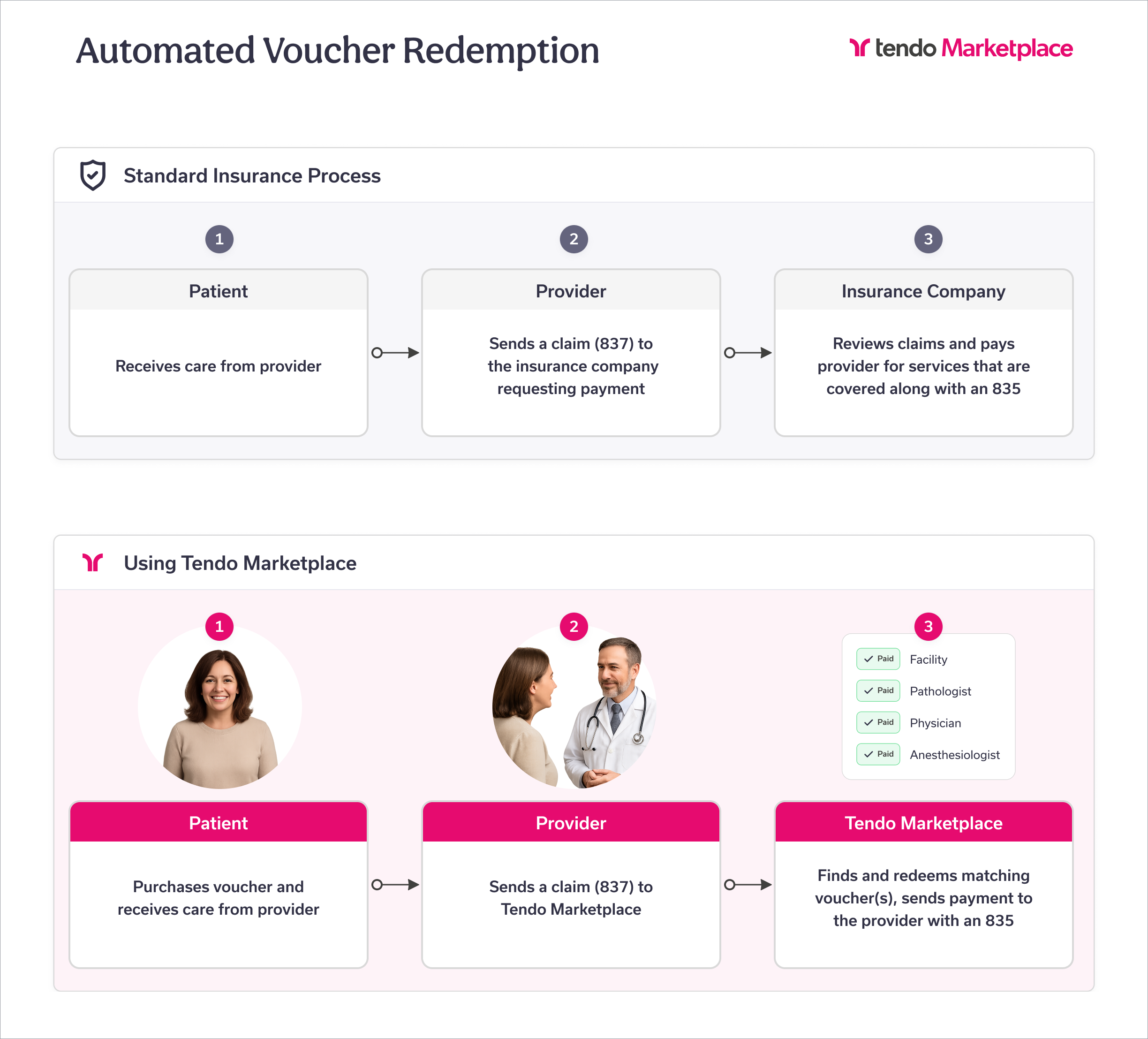
Detailed Claims + Electronic Reconciliation Workflow
-
A patient or care navigator for them purchases a voucher or vouchers for a procedure on mdsave.com. The patient schedules the service(s) and goes their appointment.
Registration ensures that the patient is set up as a Tendo Marketplace (MDsave) patient in the provider’s EHR/billing system with the MDsave payer code.
The procedure is performed.
The provider codes the claim, possibly including running the claims through a scrubber to check the information on the claims.
The provider’s EHR/billing system automatically sends the claim to their clearing house, which sends it to Optum, which sends it to Tendo Marketplace.
Tendo Marketplace processes the claim and finds matching vouchers for the claim, automatically redeems the matching vouchers, and manually reviews claims for which Tendo cannot find vouchers.
Tendo Marketplace pays the provider via an ACH deposit with a trace number + sends an ERA to the provider through Optum iEDI with the information from the claims and the payment information for the vouchers being paid. This occurs on the following Tuesday or Tuesday/Thursday depending on the provider’s payment schedule. Tendo’s response for each service in the claim (CPT® code/Revenue code) includes either:
- Payment with voucher information + contractual adjustment (amount to be written off)
- Denial + reason for the denial, such as the voucher was never purchased
- The ERA is uploaded to the provider’s EHR/billing system, which matches the ERA and ACH deposit using the trace number to confirm that the provider received a payment. The provider won’t post an ERA without receiving the matching bank deposit.
- The provider’s EHR/billing system posts the payments to the individual patient accounts. Contractual adjustments are written off to prevent patients from receiving balance bills.
How to Enroll in the Claims Process
See Enrolling in Claims and/or ERA Process
Each provider (party/entity) must enroll with Optum iEDI to send Tendo Marketplace claims and receive ERAs. There are two separate enrollments.
If as the provider you don’t enroll before sending claims, Optum iEDI will reject them and Tendo Marketplace won't receive them. If you don't enroll to receive ERAs, Tendo Marketplace can’t send you an ERA through Optum iEDI.
In order to ensure that all payments to providers have a claim (and thus that the 835 can include the initial charge and contractual adjustments for each voucher), we encourage providers who are sending us claims to no longer manually redeem vouchers.